
Luxury in the Age of Meta Advertising AI Automations

The Row does not explain itself. Their Meta ads are still minimal, often silent. A model looking directly at the camera. No text overlay, no price badge, no animation. That restraint is the argument the brand makes about the object's value.
Which is why Meta Advantage+ is a structural problem for creative brands.
The creative goes through approval. The creative director signs off. It looks right in the preview tool. The campaign goes live. However the ads running in the wild look nothing like what anyone approved. Meta has reformatted them, generated video from stills, or applied overlays pulled from the product catalogue. Nobody on the brand side ever saw those versions.
What the preview tool shows and what Meta actually delivers can be two different things.
Your Meta ad is live but it doesn't look like anything you set up, here's why
Meta's Advantage+ Creative suite is the set of tools inside Ads Manager that controls how your ads look across placements. Enabled by default, it can adjust image brightness and contrast, crop for different placements, add text overlays from your product catalogue, generate slideshow videos from your stills, and add licensed music. None of this requires brand approval. It runs automatically against the creative your team spent months producing.
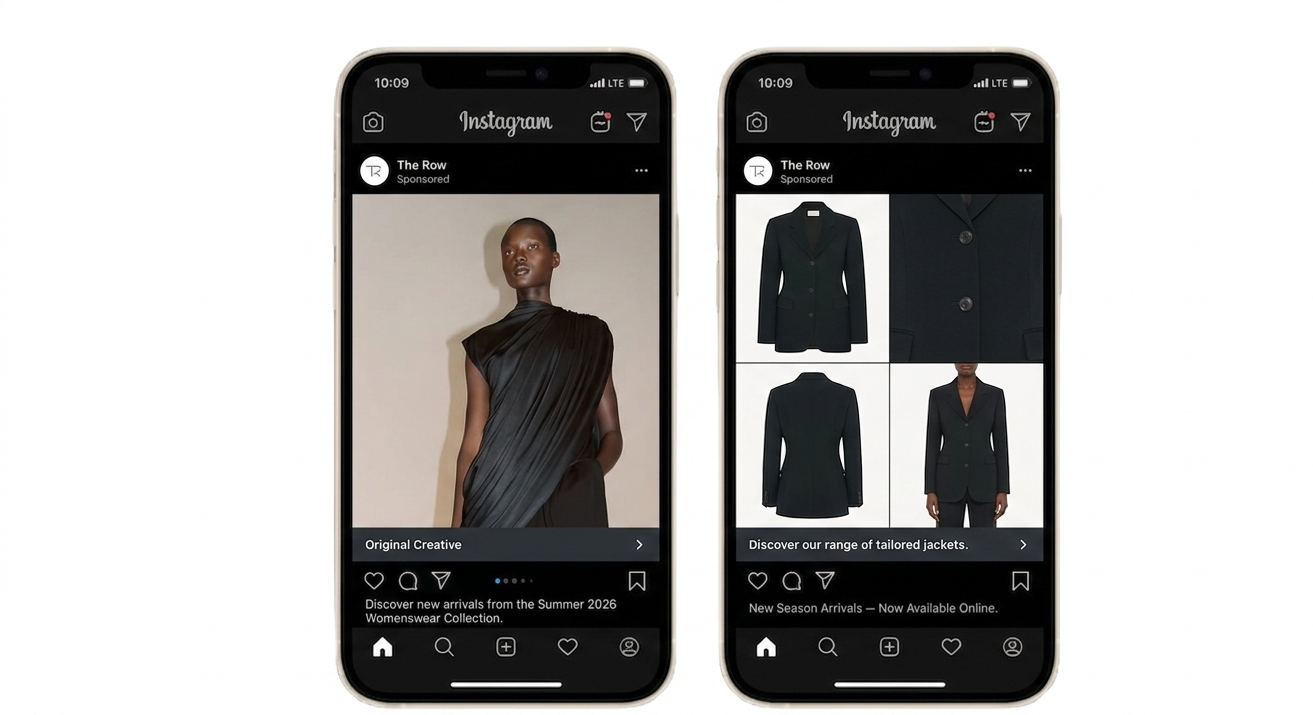
AI-generated creative example. The asset on the right represents the team-approved creative, while the dynamic four-image grid on the left was automatically generated from catalog variations of the same product using Meta AI enhancement tools.
Apart from the Creative Suite, Meta has included several ‘traps’ where it automatically enables creatives to be tested with AI features in order to support Meta with their proof of concept that Automated creatives can work better. Within the Commerce Centre, we have discovered that there is an automatic video feature that assembles catalogue images into video units for Reels, Stories, and Feed without you uploading a video or approving the output. A coat photographed against the muted tones of a Parisian winter looping against a generated background. A product image that took weeks of retouching was reduced to a slideshow with a beat under it.
Why this matters more for creative and premium brands than for most
For most direct-to-consumer (DTC) categories, some creative variation is an acceptable trade-off. For example a bad crop does not kill a conversion.
Creative and premium brands cannot afford to have their image dictated by AI automations by Meta. The visual language of a brand like The Row or Brunello Cucinelli, the aspect ratio, the negative space, the silence in the edit, is the mechanism by which the object signals the world it belongs to. When that language is overwritten by an algorithm optimising for click-through rate, the brand does not just look slightly off, it looks like something else entirely.
Meta measures and focuses on engagement as part of the campaign objective. Therefore it will optimise toward what drives more of it, regardless of what that does to a brand built on the opposite logic.
A campaign that generates more clicks because the algorithm turned your editorial imagery into a slideshow with a pop track is not a better-performing campaign. It is a cheaper version of something your brand spent a long time building carefully, that may evoke curiosity and engagement but for the wrong reasons.
How to turn off Meta Advantage+ Creative and protect your brand
Most of these automations can be disabled. They live in different places across Ads Manager and Commerce Manager, do not carry over when you duplicate an ad, and Meta re-enables some of them after platform updates. Reviewing these settings needs to be a fixed step in your pre-launch process every time.
How to turn off Advantage+ Creative enhancements at the ad level
There is no campaign-level off switch, this must be done individually for each ad. It is very time consuming but imperative if you want to ensure Meta shows what you have approved.
In Ads Manager, go to the ad level.
In the Creative section, find Advantage+ Creative (sometimes labelled “Creative enhancements”).
Click Edit and toggle off each enhancement individually: image brightness and contrast, text overlays, image templates, music, 3D animation, and video enhancements.
Save before publishing.
When you duplicate an ad, Meta often re-enables these. Always check the duplicated version before it goes live.
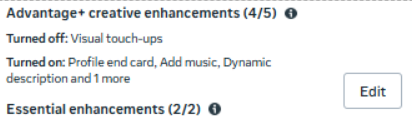
Advantage+ Creative enhancements as they appear in Ads Manager
If you are running catalogue ads, check this separately, as the settings sit in a different place. Switch to manual media setup to stop images or videos from being added dynamically.
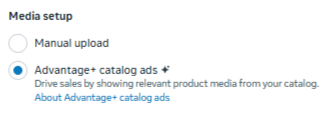
Media setup in Ads Manager showing Advantage+ catalog ads selected
How to turn off automatic video in Commerce Manager
This is the setting that assembles your catalogue images into video units without any upload or approval on your side.
Go to Commerce Manager at business.facebook.com/commerce.
Select the relevant catalogue and go to Settings.
Find the Automated Ads or Creative Automation section.
Toggle off Automatic Video (also labelled Auto-Generated Video in some accounts).
Save.
If you cannot find it at the catalogue level, check under the specific product set being used for your campaign.
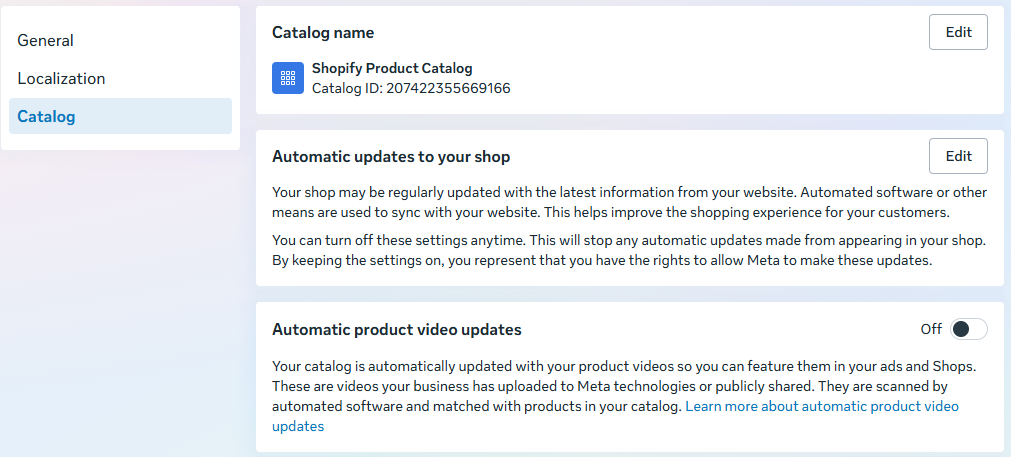
Commerce Manager catalogue settings
How to switch from Advantage+ Placements to Manual Placements
Advantage+ Placements frequently pushes your creative into Reels, with its own aspect ratio and cropping logic applied to assets never designed for it.
At the ad set level in Ads Manager, go to Placements.
Switch from Advantage+ Placements to Manual Placements.
Select only placements for which you have approved creative and upload separate assets for each.
This adds production work but it also means the ad a customer sees in Stories format is the one your brand designed for Stories.
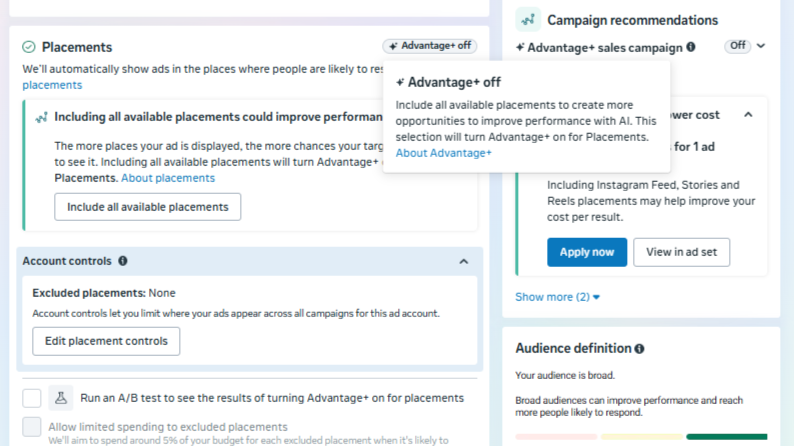
The Advantage+ off selection in Placements
The broader point on Advantage+ and brand control
We are not arguing against Advantage+ entirely. The targeting and budget optimisation elements are genuinely useful for creative brands running paid media on Meta. What we are saying is that the creative layer needs to stay with your brand.
Meta’s incentive is performance on the platform’s terms whereas your incentive is a brand that holds its value in the market over time. Go through your active campaigns today and check these settings. The defaults are not set up in your brand’s interest.
If you want to work through how to structure this across your account, book a conversation with us.
